McAfee Error with Faulty Antivirus Update
| | 0 commentsLabels: McAfee Antivirus, update
The Windows XP PCs were brought down all over the world due to a faulty antivirus update for which the McAfee is struggling hard to fix it before it cause more damage, however the condition is still dreadful in respect to the computer vendors.
The CTO of the security management system company Big Fix, Amrit Williams reported the USA Today that nothing will work in automating the affected computers as every process has been tried to fix it. it may take around weeks to process it as every single machine of the system would have to be individually tested and repaired as needed.
The problem occurred when the computers with Windows XP Service Pack 3 began to shut down in a minute of its starting up when the customers had downloaded the upgraded version of the McAfee VirusScan. An undesirable affect has been witnessed on the micro blogging site Twitter.
However, only .5 % customer PCs were hit with the antivirus, but it affected largely over the small and the large business companies, also damaging the computers at the hospitals and other municipal services. However, some competitors are taking due advantage of it and rubbing the salt in the wounds.

Spyware Protection by registry cleaning
| | 0 commentsLabels: anti-spyware, Spyware protection

Spyware is really a big security threat people are facing now a days. The nasty programs are capable of draining every single bit information from your PC. They make your PC accessible to anyone. Adware are Spyware monitors the user’s activity on the Internet and the type of software the user uses on the computer. These Spyware do affect the smooth operation of the computer by slowing down the system. They can be removed with Anti-Adware or Anti-Spyware in addition the registry must also be cleaned.
Step: 1 Click the "Start" menu button to open the Start menu.
Step: 2 Click "Run."
Step: 3 Type "regedit" into the text field and press "Enter."
Step: 4 Access the many different entries in your Windows XP registry. It is separated into primary sections: HKEY_CLASSES_ROOT, HKEY_CURRENT_USER, HKEY_LOCAL_MACHINE, HKEY_USERS and HKEY_CURRENT CONFIG. Each section contains a different set of entries related to different aspects of Windows XP operation.
Step: 5 Click on one of the plus-signs (+) next to one of the root directories, opening a more detailed list. This second level will have more directories to choose from, and will make it easier for you to find entries you need to clean the registry.
Step: 6 Delete entries in the registry that you know are either causing conflicts or are no longer necessary. Do this by pressing the "Delete" key, or by right-clicking on your mouse and choosing "Delete entry."
Step: 7 Invest in a third-party registry application to help you clean your Windows XP registry. Several programs are available that do the dirty work for you. Some even include backup capabilities to retrace their steps in the event of a critical error.
Step: 8 Clean your boot records by changing which programs load themselves at startup. Click through both the LOCAL_MACHINE and CURRENT_USER directories until you reach Software/Microsoft/Windows/Run and RunOnce. From here, you can clean out registry entries that are causing certain programs to run on startup.
Facebook Virus
| | 0 commentsLabels: Antivirus upgrade, security, virus attack
 Due to frequent attacks of viruses on social networking sites, Facebook has decided to increase its security level for its users. Facebook is trying not only to protect the privacy of its users but also wants to provide security against malicious threats, like viruses, spyware and spam.
The pressure on social networking sites to take action on the security front comes increasingly from parents who are concerned about their children’s online security. In the recent statement Facebook they will be creating a special support team that will provide guidance to parents on how to maintain security level for their child while they are using Face book.
However many technocrats are worried about hackers who sends unprecedented spam to more than 400 million registered users. Experts want Facebook to have more resistive security protocol measures in order keep a check on spammers.
Facebook claims that it has introduced new era of technology measures such as CAPTCHAs (Completely Automated Public Turing tests to tell Computers and Humans Apart), which is an automated computer application that runs on the server. If the application detects that a particular users is sending message in an erroneous manners, it will instantaneously block that user.
Follow following steps to remove facebook virus.
STEP 1: Terminate the following processes:
fbtre6.exe
mstre6.exe
STEP 2: Delete the below mentioned registry values:
HKEY_LOCAL_MACHINE\SOFTWARE\Microsoft\Windows\Current Version\Run\"systray" = "c:\windows\mstre6.exe"
HKEY_LOCAL_MACHINE\SOFTWARE\Microsoft\Windows\Current Version\Run\"systray" = "C:\Windows\fbtre6.exe"
HKEY_CURRENT_USER\AppEvents\Schemes\Apps\Explorer\Navigating
STEP 3: After deleting the registry entries, delete these files:
C:\\Windows\\fbtre6.exe
C:\\Windows\\fmark2.dat
Top Antivirus Software Program
| | 0 commentsLabels: antivirus, best antivirus
Today users always get confused in selecting the top antivirus along with several options available in the market. While choosing the best antivirus software program for your PC, you should do antivirus comparison analyze according to your requirements and after that look for the features that suit you.
With the availability of a variety of antivirus brands, it is very difficult to choose the best antivirus software for your PC. Although most of them look similar, there are major differences in their features. The most important issue which every user should consider while making a option is usability and compatibility with his PC and operating system.
Here is the list of top 10 antivirus programs along with their brief features:
Kaspersky Antivirus: It is one of the most trusted antivirus programs that provides the vital protection you need to guard your PC against Internet threats. Kaspersky not only protects against viruses, spyware, Trojans, rootkits, but also detects application vulnerabilities, scans websites for malicious software and offers a line of defense against phishing and identity theft.
NOD 32 Antivirus: It is an effectual and easy-to-use antivirus program that provides real-time protection against worms, Trojans, malware, phishing, and hackers. It not only stops the viruses to enter your computer, but prevents malware from degrading the performance of your PC.
Bitdefender Antivirus: It provides better protection by preventing your PC against viruses, spyware and phishing attacks. It scans e-mail and instant messaging traffic in real time and blocks spyware programs that track your online activities.
AVG Antivirus: It offers numerous enhanced features. Apart from preventing the stretch of viruses on your PC, it also checks your system for malicious content. It has Web Shield that allows you to download and exchange files preventing your computer against the risk of virus infections.
McAfee Antivirus: McAfee PC security and virus scan offers upbeat PC security that help prevent malicious attacks, search and download files without any threat from virus infections. It detects, blocks, and removes viruses, spywares and adware from your PC and warns you before accessing dangerous scam websites that try to steal your personal information.
Avast Antivirus: It offers full virus protection. It will let you safely browse through the Internet, block hacker attacks to protect your identity, and keep your mailbox free from spam. Daily automatic updates ensure complete data protection against all types of malware and spyware.
Norton Antivirus: This software offers effective protection against wide-ranging security threats to protect your PC. Incorporated with advanced features, it provides instant messaging scanning, script blocking and POP3 and SMTP e-mail protection.
Trend Micro Antivirus: It provides vital security you need to safeguard your critical data. Powered by PC-cillin Internet security engine, it protects your PC from unpredicted intrusions.
Panda Antivirus: This software provides one of the most intrusive protections against viruses, spyware, rootkits, hackers, online frauds, and identity theft.
F-Secure Antivirus: It thoroughly scans your PC and its built-in anti-spyware scanner provides enhanced protection against virus and spyware intrusions.
Install antivirus software on Windows XP?
| | 0 commentsLabels: antivirus, intall antivirus, virus-threat
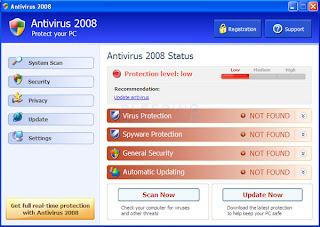 Your PC can be infected by virus, spyware, threats even if you have an antivirus installed. I constantly advised to regularly update your antivirus and secure your PC against latest virus-threats. Users want to install an antivirus program on his Windows XP PC.
Basic Steps To Install Antivirus Program
Download Antivirus:- Download the antivirus program of your choice. Save the installation setup on your desktop.
Start Setup:- Double-click on the setup file on the desktop.
Begin Installation:- Click on “Next” followed by “Yes” to begin the installation process.
Follow Instruction:- Follow the onscreen instructions and wait for the installation process to complete. This may take several minutes depending upon the speed of your Windows XP PC.
Click Finish:- Click on “Finish” to complete and exit the installation process.
Update:- Right-click on the antivirus icon on the bottom right of your desktop screen. Select “Update” to update antivirus program. You should repeat the procedure once a week.
Upgrade Antivirus To Avoid Sudden Virus Attacks
| | 0 commentsLabels: antivirus security, install antivirus, upgrade antivirus
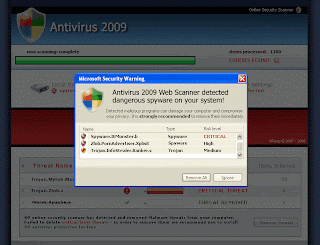 In today’s revolutionary, world where each and every individual is directly or indirectly dependent on computer, it is very essential to maintain fitness and efficiency of system. With this thought, I downloaded and install antivirus security software to safeguard my HP laptop from nasty threats and virus. One day while working on my computer, I saw some unknown virus infections in my PC. I searched a lot to find out proper tools to get rid of them but could not find a proper solution. Then a very close friend of mine suggested me to have proper antivirus upgrade from certified technical organization.
Features
Antivirus security program plays a very vital role in system authentication and protection. It safeguards the computer system against all kinds of rouge application codes, such as virus, adware and malwares. An antivirus security program provides protection against following issues-
· Slow performance of PC-Virus attack causes malfunctioning of various windows registry files, which in turn slows down the performance of system to large extent.
· System freeze and halt-Virus causes sudden freezing and halting of system screen which affects the working efficiency of system.
· System crash-If not scanned at right time, it can cause system failure or blue screen of death to extreme case.
· Hardware failure- Due to malfunctioning of software applications, memory load increases, which causes hardware disabilities, such as corruption of RAM.
If you find yourself uncomfortable with procedure to upgrade antivirus software, simply follow the steps mentioned below-
Upgrade Antivirus Software on Windows O.S.
STEP 1-To manually update antivirus security software, open your Internet browser and navigate to initial page of company that produced your antivirus security software.
STEP 2-Look for “Downloads” option and click on particular link.
STEP 3-Look for updated version of antivirus security program and download it. After that, run the setup of antivirus software.
STEP 4- Remove the antivirus security software that is previously installed on your system through control panel.
Usability
Visit to site of particular antivirus security software program that you are using at present and look for option of upgrade to higher version. Alternatively, you can also remove current antivirus software using control panel and install another antivirus program through search engine.
Recommendation
I strongly recommend you to have a certified technical support to upgrade antivirus security program from lower version to higher. Certified technical support provides quality security measures to make system free from all nasty threats.
McAfee VirusScan
| | 0 commentsLabels: McAfee, McAfee Antivirus, McAfee Support
Enjoy comprehensive tech support for your McAfee products by calling iYogi’s toll free phone number 1-800-237-3901.
Get unlimited support for all McAfee products and software with the assistance of expert technicians at iYogi and ensure the health and security of your PC from all kinds of viruses and online security threats.
Call iYogi at our toll free phone number and get connected to our tech experts for comprehensive McAfee support. We are available 24/7 all around the year.
Our Microsoft Certified technicians will take your calls 24/7/365 and ensure that all aspects of McAfee support are met and executed with absolute precision and accuracy. We have wide scope of services for McAfee products and software for the most effective protection of your PC from viruses, malware and other malicious programs including online and networking threats.
Call now at our toll free phone number for yearlong McAfee support. We are available anytime, anywhere.
Features
Here’s what you get with our award winning service:
• Get comprehensive McAfee support at a nominal price of $139.99 per year, and ensure your PC’s health and security.
• Our services are remotely enabled through the Internet or over a phone call.
• Our tech experts are available 24/7/ 365 anytime, anywhere.
• Our highly skilled Microsoft Certified technicians have been selected from the best in the industry to provide the best services.
• iYogi’s customer satisfaction is not only the highest at 95% but also award winning.
Scope of Service
Under our unlimited McAfee support plan, you will also be entitled to our other services which include:
• Diagnostic & repair of your hardware issues.
• Troubleshoot software errors.
• Update drivers and security to protect against online threats.
• Connect to the Internet, devices and peripherals.
• Optimize your PC’s speed and performance.
At iYogi, we support all McAfee products and software, including McAfee Antivirus Plus, McAfee Internet Security, McAfee Firewall, McAfee Online Backup, McAfee Family Protection, VirusScan, VirusScan Professional, McAfee Total Protection, McAfee QuickClean, McAfee Utilities, and much more.
Subscribe to:
Posts (Atom)